Ludo King®
- 4.1
- Rating
- 1.00B
- Installs
- Free
- Price
 Analysis by App-foxy
I have always liked board games that can turn a quiet evening into a small social event, and Ludo King® fits that role unusually well. It takes the familiar race-around-the-board format and places it on a phone, making it easy to start a match with family or friends without setting up a physical board. I found it simple to understand, quick to revisit, and especially comfortable for casual play rather than serious strategy sessions.
That simplicity is also the reason it has reached such a broad audience. Gametion’s board game is free to download, suitable for Everyone, and available for devices running Android 7.0 or later. It has passed over a billion installs and holds a 4.2 average from around ten million ratings, so this is clearly not a niche interpretation of Ludo. My experience is that its biggest strength is not complexity; it is the low effort required to get a familiar game going.
How comfortably Ludo King works for different players and situations
I look at how comfortably Ludo King works across different players and everyday situations, from a relaxed family match to a quick game while waiting. The key is not just knowing the rules, but arranging the screen and setting a pace that lets everyone take part without feeling rushed. That practical fit leads naturally to the limits worth weighing before choosing it.
In-Depth Coverage of Ludo King®
Readable boards and straightforward navigation
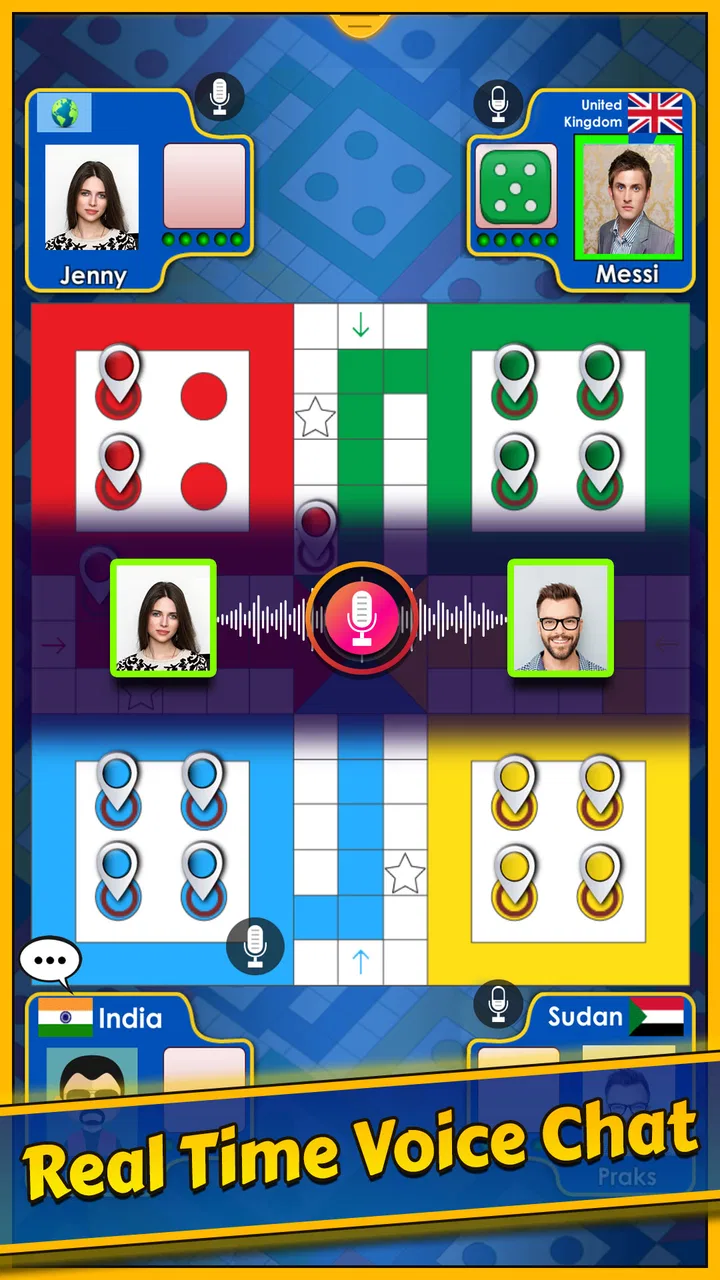
The first thing I noticed was how quickly the main idea becomes clear. The board, colored home areas, playing pieces, dice and turn indicators all follow the visual language people expect from Ludo. That matters because a player does not have to learn an unfamiliar interface before enjoying a match. Someone who has played the tabletop version can usually understand what to do almost immediately, while a newcomer can learn by watching the first few turns.
The game’s visual layout is at its best when the board is the main focus. Pieces occupy recognizable spaces, and the dice provides an obvious action point. That makes the basic loop—roll, choose a movable piece, and continue toward home—feel natural on a touchscreen. I also appreciate that the game does not require a large collection of menus or complicated controls to perform the central action.
For younger players and relatives who are not comfortable with mobile games, this is a real advantage. I can hand the phone to someone and explain the objective in a few sentences instead of giving a long tutorial. The familiar colors also help players remember which pieces belong to them, although people who have difficulty distinguishing colors may need to rely more heavily on position and turn information.
One practical tip is to play a short trial match before inviting a large group. This lets each person check whether the board is comfortable to follow on their own screen and whether the turn flow feels clear. A phone held too far away, a small display, or a bright room can make a board game harder to read even when the interface itself is uncomplicated.
The navigation is most approachable for people who prefer direct visual choices. It is less ideal for anyone who depends on highly customized text size, spoken guidance, or a very keyboard-oriented interface. I would not describe the game as difficult to navigate, but ease of navigation should not be confused with comprehensive accessibility. Its clarity comes mainly from the familiar board design, not from a deep set of personalization tools.
Touch controls, pace and sensory comfort
Playing Ludo on a touchscreen removes much of the physical setup associated with a traditional board. There are no small cardboard pieces to arrange, no loose dice to retrieve, and no need to reach across a table. That can make the digital version useful for players who find tabletop components awkward to handle. A tap is generally less demanding than repeatedly picking up and moving several pieces by hand.
At the same time, touch interaction is not effortless for everyone. A player with limited precision may find it difficult to select the intended piece when several pieces are close together. Accidental taps can also be frustrating in a game where one turn can change the result. I found it helpful to pause briefly, identify the available move, and tap deliberately rather than rushing as soon as the dice result appears.
This is one of the less obvious trade-offs of the digital format: it reduces the motor work of managing a physical board but increases dependence on accurate screen contact. Someone who has trouble with fine finger movement may prefer playing on a larger device, if available, because extra screen space can make individual pieces easier to target. The game itself remains the same, but the device can strongly affect comfort.
The pace is generally suitable for casual group play, though it may not suit people who become uncomfortable with repeated visual motion, bright effects, or game sounds. I recommend lowering the device volume or playing in a quieter setting if sensory stimulation becomes distracting. Since the central game is turn-based, a player can also take a moment to orient themselves before acting instead of responding continuously like they would in an action game.
Another useful habit is to keep the device stable on a table or stand. Holding it in one hand while tapping with the other can be tiring, particularly during a longer match. A stable position reduces accidental movement and makes it easier for multiple people to look at the board. For a family gathering, placing the phone where everyone can see it may be more inclusive than passing it rapidly from player to player.
Where the game fits into everyday life
I think the strongest use case is a relaxed match during a family visit. Imagine four people sitting together after dinner: one person knows traditional Ludo, another rarely plays mobile games, and the younger players want something they can understand immediately. The digital board removes the need to find a physical set, and the familiar rules give everyone a common starting point. It works particularly well when the goal is conversation with a little competition rather than an intense gaming session.
It can also fill short gaps in the day, but I would not treat every match as a quick distraction. A game can take longer than expected when players are chatting, thinking through moves, or waiting for turns. That is fine when the session is social, but less convenient if you only have a few uninterrupted minutes. I prefer starting it when I can finish a match without repeatedly putting the phone away.
You May Also Like

 AccuWeather: Weather Radar
AccuWeather Review: A Quick, Clear Forecast for Everyday Decisions
For everyday plans, the best forecast is the one you can understand quickly. AccuWeather makes rain timing, radar, and local conditions easy to act on, with a few trade-offs.

 Hill Climb Racing
Why Hill Climb Racing Still Turns Crashes Into One More Run
A tiny car, a bumpy hill and one more upgrade: Hill Climb Racing keeps resurfacing because its simple chaos makes every near-miss feel personal.

 AliExpress - Shopping App
AliExpress Makes Global Shopping Feel Personal, but Shoppers Bear the Risk
AliExpress turns a global marketplace into a pocket-sized discovery engine. Its reach is useful, its shopping loop compelling, and its trade-offs easy to miss.

 Lords Mobile: Kingdom Wars
Lords Mobile Is a Kingdom-Building Routine, Not a Quick Match
A case-by-case verdict on the building, battles, device demands, and social commitments that make Lords Mobile rewarding for some players and exhausting for others.

 PDF Scanner app - TapScanner
TapScanner Makes Paperwork Easier to Capture, Check, and Share
TapScanner makes scanning with a phone feel less like a rescue operation and more like a dependable step in getting work done. Its capture tools are useful, though not flawless.

 Block Blast!
 Shows How Much a Puzzle Game Can Leave Out
A quiet grid game shows why puzzle players increasingly value instant clarity, repeatable skill and low-pressure play—and where the genre still needs to catch up.
More From Our News Desk
View All News


The free entry point makes it easy to suggest to friends without asking them to buy a board game first. However, free does not mean completely free from commercial considerations. In-app purchases range from $0.49 to $369.09 per item, so I would be careful about spending decisions, especially when children use the device. The most sensible approach is to enjoy the core game first and treat optional purchases as something to consider deliberately, not as a requirement for learning Ludo.
The Everyone age rating makes the game broadly suitable for families, but age suitability in practice still depends on how a household handles screen time, purchases, and competitive frustration. A child may understand the rules while still needing help with device settings or payment decisions. I would let younger players enjoy the match while keeping purchase control with an adult.
For remote social play, the appeal is obvious: a familiar board can give friends or relatives something shared to do even when they are not in the same room. Still, the quality of that experience depends on each person’s device, connection and comfort with the interface. If one participant struggles to see the board or follow whose turn it is, the social advantage can quickly become a source of irritation. A short practice round is worthwhile before organizing a larger session.
What different abilities may find easy or difficult
Players with limited mobility may appreciate that the game does not demand the repeated grasping and repositioning of physical pieces. The essential interaction is compact: observe the result, select a piece and wait for the next turn. That makes it less physically intensive than a tabletop setup for some people. A phone or tablet positioned at a comfortable angle can also reduce the need to lean across a table.
Players with visual difficulties may have a more mixed experience. The board uses distinct colors and recognizable locations, which helps with basic orientation, but color alone is not a reliable way for everyone to identify pieces. If a player has trouble separating similar colors or seeing small objects, a larger display and good lighting may help. I would also avoid placing the device under glare, because reflections can make the board and dice result harder to distinguish.
People with attention-related needs may benefit from the predictable turn structure. There is one board, one active turn and one main decision at a time. On the other hand, a long session with repeated dice outcomes can feel monotonous, particularly for someone who needs frequent changes of activity. In that case, agreeing on a shorter session before starting can prevent the game from becoming tiring.
For players who process information more slowly, the board game format is gentler than many fast mobile genres. There is no need to react to an opponent in a fraction of a second. I found that taking a breath before choosing a piece makes the game more comfortable and often leads to better decisions. The social group also matters: patient players make a much bigger difference than any interface setting.
Hearing-related needs are less central to the board itself because the important information is visual. That does not automatically make every situation equally comfortable, though. In a noisy room, players may miss spoken explanations or comments from the group, so it helps to keep the board visible and agree on simple turn-taking. Conversely, players sensitive to sound can keep the device quieter and focus on the visual sequence.
Situational access beyond the screen
Accessibility is not only about disability. It is also about whether the game remains usable in ordinary, imperfect circumstances. Ludo King is convenient when a physical board would be impractical: while traveling, during a wait, in a small living space, or when family members want to play without searching for missing pieces. The phone format makes storage and setup almost irrelevant.
That convenience has limits. A small phone screen is harder for several people to share than a large tabletop board. If the game is placed flat on a table, a seated player may have to lean forward or change position repeatedly. If it is held in one person’s hands, the rest of the group may struggle to see. The best arrangement is usually a stable, central position with enough light and a clear view for everyone.
Battery and connectivity are also practical considerations for any mobile game session. I would begin a planned group match with a reasonably charged device rather than relying on a nearly empty phone. For a spontaneous game, this is less important, but interruptions are especially annoying when several people have invested time in the same match.
The game is a better choice for shared casual entertainment than for players seeking a deep strategic board-game experience. Dice introduces luck, and the simple rules keep the focus on turns, captures and reaching home rather than on a large decision tree. If you want elaborate planning, asymmetric abilities, or a campaign with evolving complexity, a dedicated strategy board game will probably offer more depth.
It is also not the best fit for someone who dislikes competition based partly on random results. A good move can still be undermined by an unlucky roll, and a careful player may not feel fully rewarded every time. I enjoy that unpredictability when playing with family because it keeps the match light, but I understand why a strategy-focused player might prefer chess, checkers, or another game where planning has more control over the outcome.
Remaining friction before I would recommend it universally
The biggest barrier is not learning the rules; it is the surrounding mobile experience. A free game with in-app purchases requires sensible supervision when shared with children or anyone who may tap through purchase prompts without understanding the cost. The listed item range reaches from $0.49 to $369.09, which is a meaningful difference in spending risk. I would review the device’s purchase protections before handing the game to a child.
Another limitation is that a familiar visual design can still be demanding for players who need larger controls, stronger contrast, or non-color indicators. I would not assume that recognizing the board means every player can comfortably interact with it. Testing one match on the actual device is more useful than judging accessibility from the game’s category or age rating.
Social pressure can create a barrier too. A player who needs more time to interpret the board may feel rushed by impatient opponents, even though the game itself is turn-based. The most inclusive group is one that announces whose turn it is, keeps the device visible, and avoids grabbing it away before the active player has finished. Those small habits improve the experience more than trying to force a faster pace.
There is also a difference between being easy to start and being comfortable for extended play. I can recommend it for a few rounds, but I would not automatically suggest a long tournament to someone with hand fatigue, visual strain, or difficulty concentrating over time. Breaks, a larger screen, and a stable stand can make a considerable difference. If those adjustments still do not help, a physical board with larger pieces may be the better option.
My inclusive verdict after playing
I recommend Ludo King® to families, casual players, and anyone who wants a recognizable board game without carrying a physical set. Its clear core layout, gentle turn-based pace and low learning curve make it approachable across generations. Gametion has captured the social feeling of Ludo more successfully than the complexity of a modern strategy game, and that is exactly why it works in living rooms, waiting areas and informal gatherings.
My recommendation comes with practical conditions. Use a screen that everyone can see, keep the device steady, allow extra time for players who need it, and check purchase protections before children play. If color distinction, tiny touch targets, sound, glare or hand control are concerns, test the game in the real setting rather than assuming the Everyone rating answers those questions.
The app is free, supports Android 7.0 and later, and has been available since December 17, 2016, which helps explain why it feels like an established digital version of a familiar pastime rather than an experimental board game. Its 4.2 average from around ten million ratings and over a billion installs show broad popularity, but popularity should not replace personal testing when accessibility matters.
For me, the final decision is simple: choose it when shared familiarity and easy setup matter more than strategic depth or extensive customization. Skip it when you need highly adjustable accessibility controls, dislike luck-driven outcomes, or want a board game designed around long-term tactical planning. In the right group, it is an inviting way to play together; in the wrong setting, its simple interface and touchscreen demands can become noticeable limitations.
FAQs for Ludo King®
01What is Ludo King® and how does it work?
Ludo King® is a digital adaptation of the classic board game, Ludo. It allows players to enjoy the game on their mobile devices, either by playing against AI or competing with friends online. The goal is to navigate all four tokens from start to finish based on dice rolls, while strategically blocking opponents.
02Can I play Ludo King® offline?
Yes, Ludo King® offers an offline mode where you can play against the computer or with friends on the same device. This makes it convenient for users who may not always have internet access but still want to enjoy a game of Ludo.
03Is Ludo King® free to download and play?
Ludo King® is free to download and play. However, it includes in-app purchases for additional features and enhancements, such as themes and stickers. While these purchases can enhance your gaming experience, they are not required to enjoy the game.
04Are there any security concerns with Ludo King®?
Ludo King® is generally safe to download from official app stores like Google Play and the Apple App Store. It's important to keep the app updated to the latest version for security patches and enhancements. Be cautious about sharing personal information in online multiplayer modes.
05What are the system requirements for Ludo King®?
Ludo King® is designed to run on most Android and iOS devices. For Android, it typically requires version 4.4 or above, and for iOS, version 8.0 or later is recommended. Ensure your device meets these requirements for optimal performance and gameplay experience.
Pros
- Engaging multiplayer mode for family fun.
- Classic board game feel with a digital twist.
- Available offline
- no internet needed.
- Supports cross-platform gameplay.
- Regular updates with new themes.
Cons
- Can be slow due to in-game ads.
- Limited customization for avatars.
- Occasional connectivity issues online.
- In-app purchases can be pricey.
- AI opponents can be predictable.

Ludo King®
Gallery